Read along, sentence by sentence.
A text-to-speech reader for Android, for anyone who finds reading hard or tiring.
Get it on Google PlayFree. Android only for now.
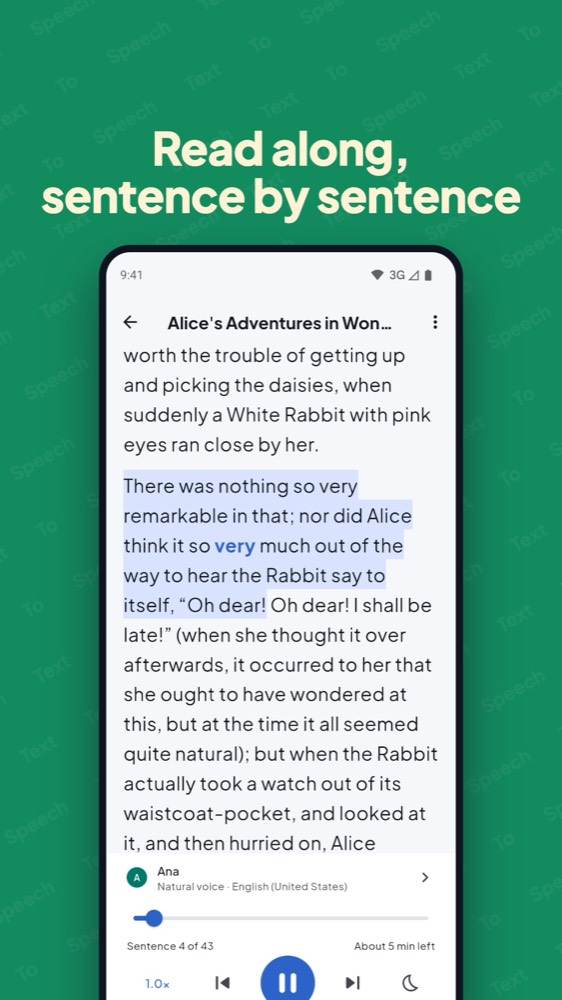
Easy to follow with your eyes and ears
- The sentence being read is highlighted and its current word is in bold. The text scrolls along, and “Follow along” brings you back if you scroll away.
- Tap any sentence to start reading from there.
- Speed from 0.5× up to 3× with your phone’s voices, and up to 4.5× with natural voices on a phone fast enough.
- Four text sizes.
- A library that remembers where you stopped in every text.
What it reads
- PDF, EPUB, Word and 10 more file types: FB2, PowerPoint, OpenDocument, RTF, HTML, Markdown, plain text and subtitles.
- Web pages and online PDFs: share or paste a link.
- Text you select in any app: tap “Read aloud”.
Private by design
- The natural voices run on your phone and work offline after one download from Google Play.
- No account to make.
- A link is fetched only when you ask, as that one page, without cookies, ads or scripts. Nothing you read is sent to me.
Details are in the privacy policy.
Price
Free: one banner on the library screen, and 30 minutes of natural voices a day. After that the app keeps reading with your phone’s own voices, with no limit.
Pro: one payment of $4.99 (US price; your store may show a local price). Unlimited natural voices and no ads. No subscription.
Questions
Is it for dyslexia?
Many people who find reading hard like to listen while following the highlighted text. It’s a reading tool, not a treatment.
Does it work offline?
Yes, for reading files and text, including the natural voices once they are downloaded. Reading a web link needs the internet for the moment it fetches the page.
Can it read web pages?
Yes: share or paste a link to a page or an online PDF. Pages that need you to sign in, or that build themselves with scripts, may have no readable text. In that case select the text in your browser and tap “Read aloud”.
Which languages?
Natural voices cover 17 languages: English, Indonesian, Spanish, Portuguese, French, German, Italian, Dutch, Polish, Russian, Ukrainian, Japanese, Korean, Vietnamese, Turkish, Swedish and Greek. Every other language reads with your phone’s own voices. The Play listing is translated into 75 languages.
Is there an iPhone version?
Android only for now.